Bookkeeping export
In the bookkeeping export you generate a bookkeeping file in a chosen format for a date range and upload it yourself to the relevant portal or accounting tool.
What is the bookkeeping export for?
You will find this page in the menu under We → Finance → Accounting → Bookkeeping export.
Here you generate a bookkeeping file in a chosen format (DATEV, FEC, FatturaPA, MTD, QuickBooks, Xero, Sage or Generic CSV) for a date range. You then upload the file yourself to the relevant authority portal or in your accounting tool. To open the page you need access to the finance or payment area; for the file to have content, there must be paid sales in the range.
The screen at a glance
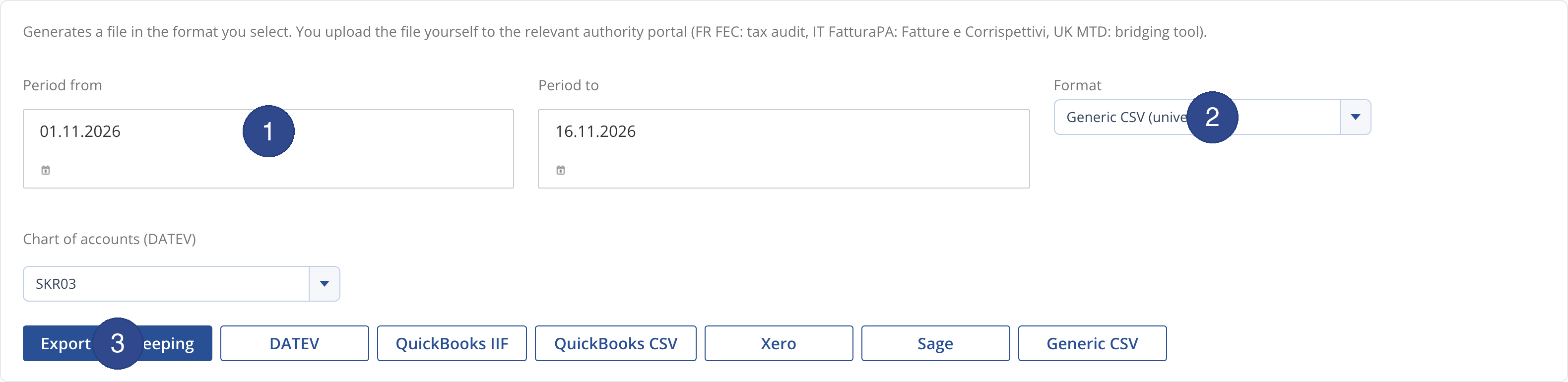
- ① Period from
- Use the Period from date picker to set the start of the range. You set the end date next to it under Period to.
- ② Format
- The Format dropdown determines the format in which the file is generated. For DATEV you also choose the Chart of accounts (DATEV).
- ③ Export bookkeeping
- The Export bookkeeping button generates the file and downloads it.
Step by step: create an export
- Open We → Finance → Accounting → Bookkeeping export.
- Set Period from and Period to.
- Choose the Format; for DATEV also the Chart of accounts (DATEV).
- Click Export bookkeeping. The file is generated and downloads; then upload it yourself to the relevant portal or in your accounting tool.
Note on the date range
Tipp A wider date range includes more bookings; a range with no paid sales yields no file.