Email campaigns & automations
Customize system emails, send email campaigns to contacts and set up automatic mail rules.
Overview
Under Contacts → Marketing there are the tabs Email campaigns (with the system emails) and Automations. This covers your entire member communication: from automatic system emails through manual newsletters to time-triggered reminders. All emails use your logo and colours in a consistent layout.
System emails
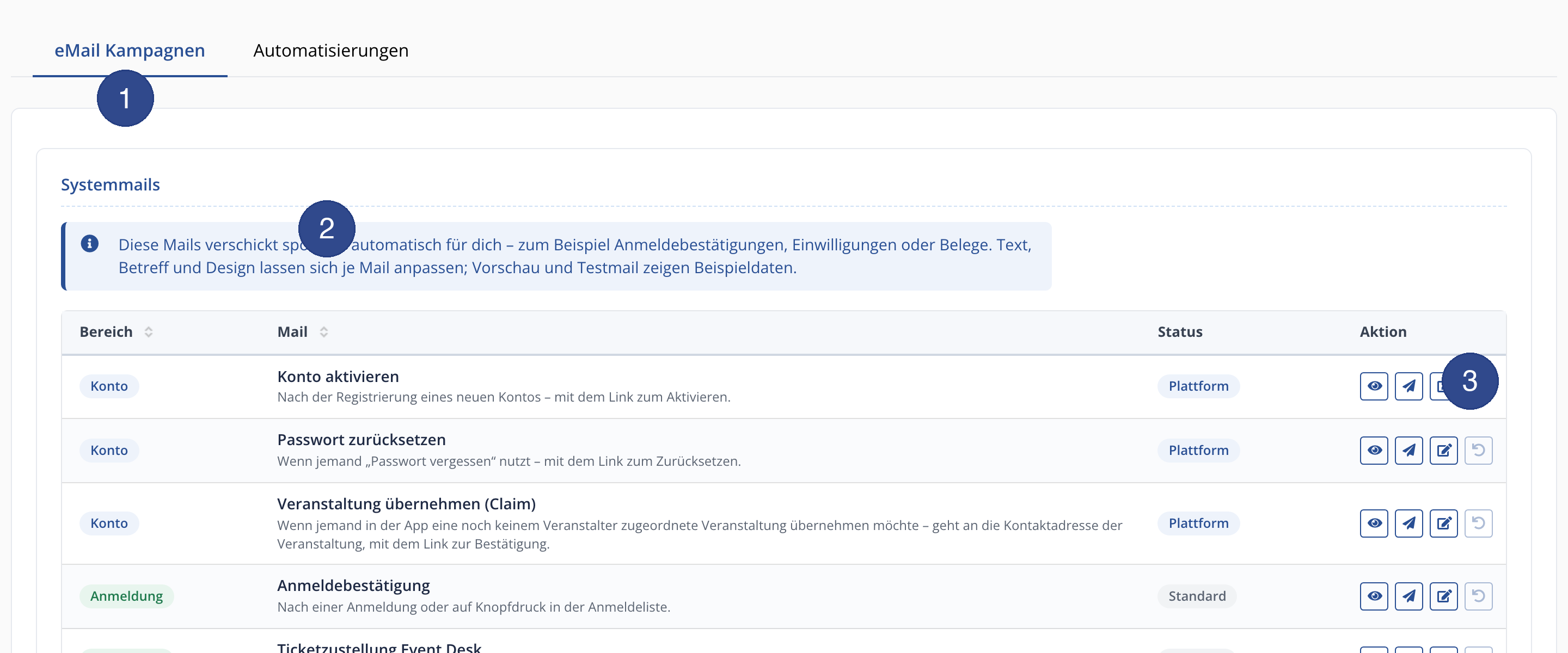
spooorts sends these emails automatically (e.g. registration confirmations, consents, receipts). Text, subject and design can be customized per email; Preview and Test mail show sample data, Reset restores the default template. Columns: area, email, status (platform/standard), action. The status Platform means the spooorts default template, Standard a version you have customized.
Email campaigns
In the Email campaigns tab you create a mail job and send it to your contacts – with an editor, placeholders and attachments. You choose the recipients via contact categories or individual contacts, create subject and content in the editor, insert placeholders such as the first name and see a preview before sending. Sent jobs are kept for tracking. In addition you see the send status and the number of recipients for each job.
Automations
Create rules that fire a mail job automatically by event or condition (e.g. 14/7/1 days before the event, before a class, on inactivity). Fields: Name, Trigger type, Sport, Offsets, Active. This way you reach participants automatically at the right time, without sending each email individually. An automation can be deactivated at any time without deleting it; the trigger type determines what the rule reacts to.