Locations
Under Locations you manage your venues such as stadiums, sports halls, training grounds and course and fitness rooms. Additional tabs cover maps and access control.
Overview
You find this page in the menu under We → Locations.
Under Locations you maintain all the places where your operation takes place — stadiums, sports halls, training grounds, course and fitness rooms or other event locations. These locations are used in many places, such as course events, events and ticket plans.
Viewing and managing locations
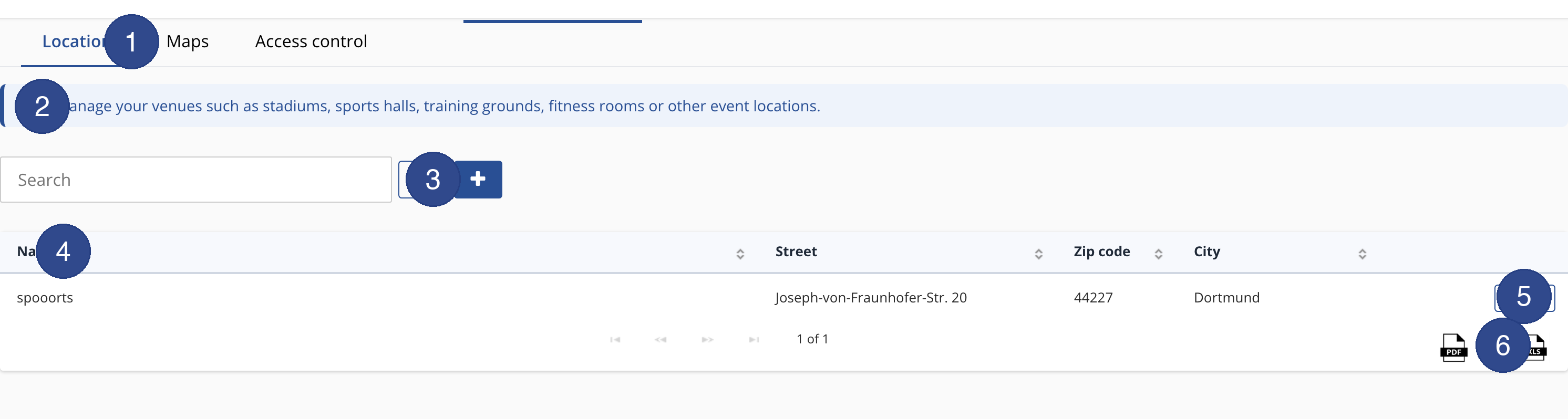
- ① Search
- Filters the location list by the text you type. The list narrows as you type, so you quickly find the right one even with many locations.
- ② Search
- Runs the search for the entered term. Useful when you want to type the full term first and then confirm.
- ③ New
- Opens the form to create a new location. There you enter the name, address and further details of the venue.
- ④ Sort columns
- Sorts the list in ascending or descending order by this column. Clicking again reverses the order, keeping even long lists manageable.
- ⑤ Edit
- Opens the location to change its details. Changes take effect immediately everywhere the location is used.
- ⑥ Delete
- Permanently removes the location after a confirmation prompt. Remove a location from events and courses first if it is still in use.
Maps & access control
Via the Maps tab you place locations on a map. Under Access control you manage the access points of a location — for example for admission by QR code or ticket.
Tips
- Create each place once as a location — it can then be reused in events, sessions and ticket plans.
- Keep the address up to date so maps and directions are correct.
- Use access control when you want to manage admission to a location.