Contract actions
Process requested membership actions — cancellation, pause, resume, renewal — and approve or reject them.
What is the contract-actions inbox for?
Under Contract actions you find the changes members requested for their membership: cancellation, pause, resume, extraordinary action, renewal or expiry. Each row shows type, status, reason and — where relevant — the effective date.
This lets you review requests in one place and approve or reject them deliberately instead of hunting for them one by one in member administration.
Menu path: Contacts → Memberships → Contract actions
The page requires access to your organization's finance and member administration.
The screen at a glance
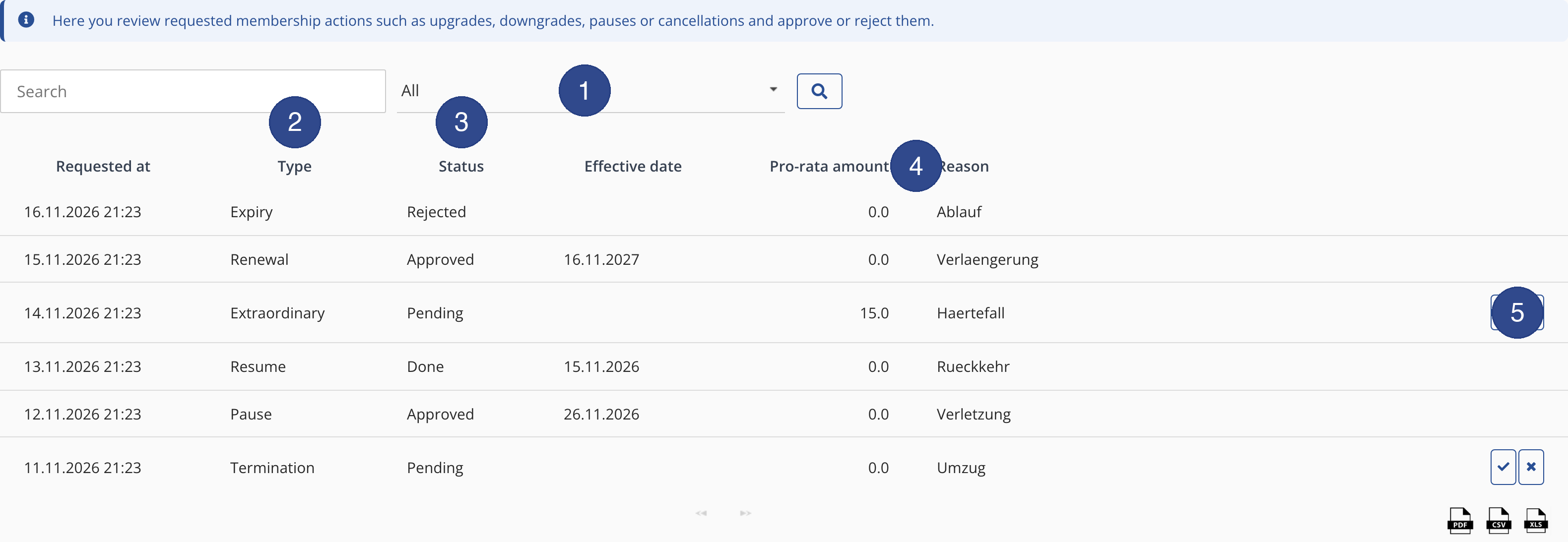
- 1 Status filter
- Narrows the list to one status (pending, approved, rejected, done) or shows all.
- 2 Type
- Kind of requested action: Termination, Pause, Resume, Extraordinary, Renewal or Expiry.
- 3 Status
- Processing state: Pending, Approved, Rejected or Done.
- 4 Reason
- The reason the member gave for the action, if provided.
- 5 Actions
- For pending requests: approve or reject.
Step by step: process a request
- Open Contacts → Memberships → Contract actions.
- Use the status filter to show pending, approved, rejected or done requests.
- For each row, check type, reason and — for pauses or renewals — the Effective date.
- For a pending request, approve or reject it via the action buttons.
Tipp Rejected or done requests are kept as history and can be reviewed again via the status filter.