Financial Reports
The financial reports provide ready-made reports on tax, revenue, receivables and more — each for a freely selectable period and exportable as PDF, CSV or Excel.
Overview
You find this page in the menu under We → Finance → Reports.
Under Reports you will find a range of ready-made financial reports — from the VAT overview and revenue development to open items and dunning levels. Each report refers to a freely selectable period and can be exported as PDF, CSV or Excel. This gives you all the figures for your accounting, your tax advisor or your advance VAT return at your fingertips.
Selecting a report
You open the individual reports via the Reports menu. The following example shows the VAT overview.
Viewing a report
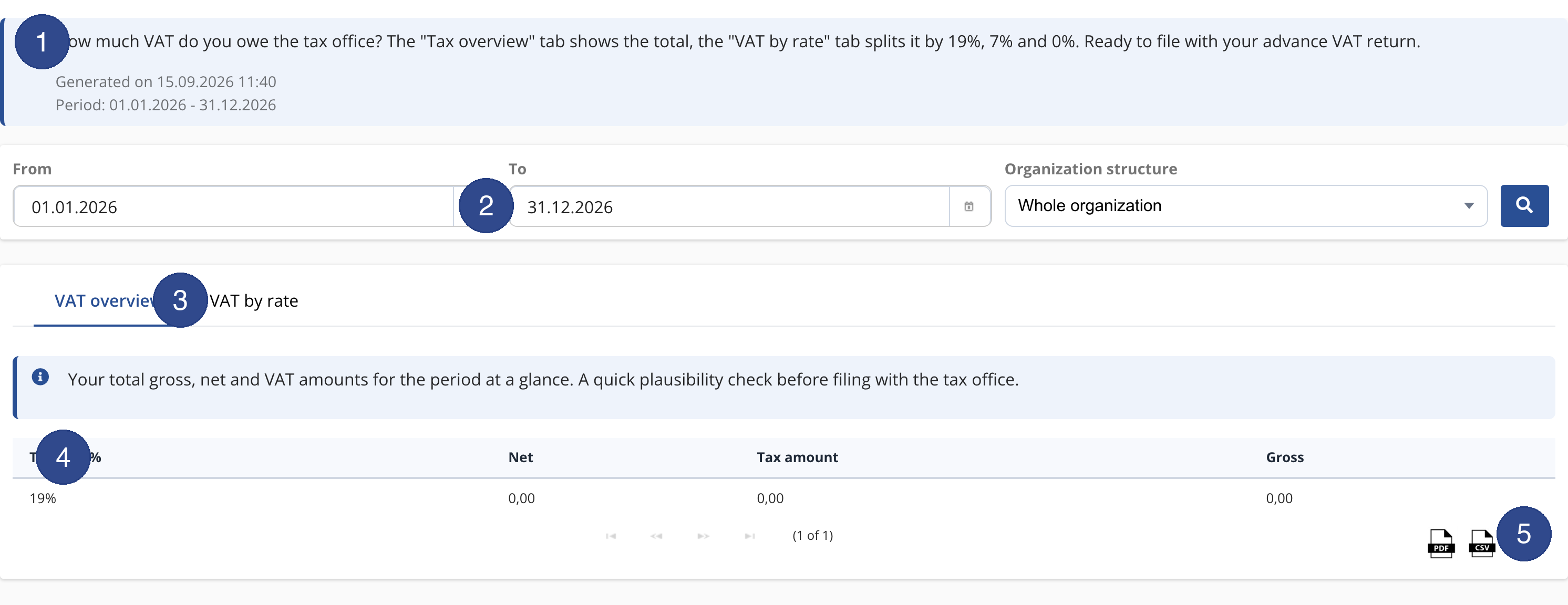
- ① Description & period
- The header explains what the report shows and states when it was generated as well as the analysed period.
- ② Period & organization structure
- Use the From and To fields to set the reporting period. With Organization structure you restrict the report to part of your organization. Clicking the magnifier refreshes the report.
- ③ Report views
- Many reports offer several tabs — in the example VAT overview (total) and VAT by rate (split by tax rate).
- ④ Report table
- The table shows the analysis — in the example, per tax rate the Net, Tax amount and Gross figures.
- ⑤ Export
- Use the icons at the bottom right to export the report as a PDF, CSV or Excel file.
Available reports
The available reports include, among others:
- VAT — gross, net and VAT for the period, as a plausibility check before the advance return.
- Revenue & sales — revenue development by source.
- Open items and dunning levels — status of receivables and dunning.
- Invoice overview and refunds.
- DATEV postings and monthly reconciliation for accounting.
- Membership fees, donations and SEPA status for club administration.
Tips
- Choose the period to match your return or billing interval (month, quarter, year).
- Use the VAT report as a plausibility check before you submit the advance return.
- Export reports as CSV or Excel for further processing or as PDF for filing.
- With several departments, narrow down specifically via the organization structure.