Vouchers
Create gift vouchers with a custom value, generate printable PDF certificates and send them to recipients by email.
Overview
You find this page in the menu under We → Finance → Income & invoicing → Vouchers.
The voucher feature lets you create gift vouchers with a freely chosen monetary value. Each voucher receives a unique code and can be downloaded as a PDF certificate or sent directly to the recipient by email.
When redeeming, the customer enters the code at checkout; the credit is offset against the invoice amount, and any remaining value is retained for later purchases. Each voucher has a status (open, partially redeemed, fully redeemed), so you keep track of outstanding obligations at all times.
Vouchers are suitable both as a gift for third parties and as credit that you issue, for example, in the event of a cancellation. Because each code is unique and carries its status, misuse through multiple redemption is ruled out, and the voucher value is always correctly reflected in your finances.
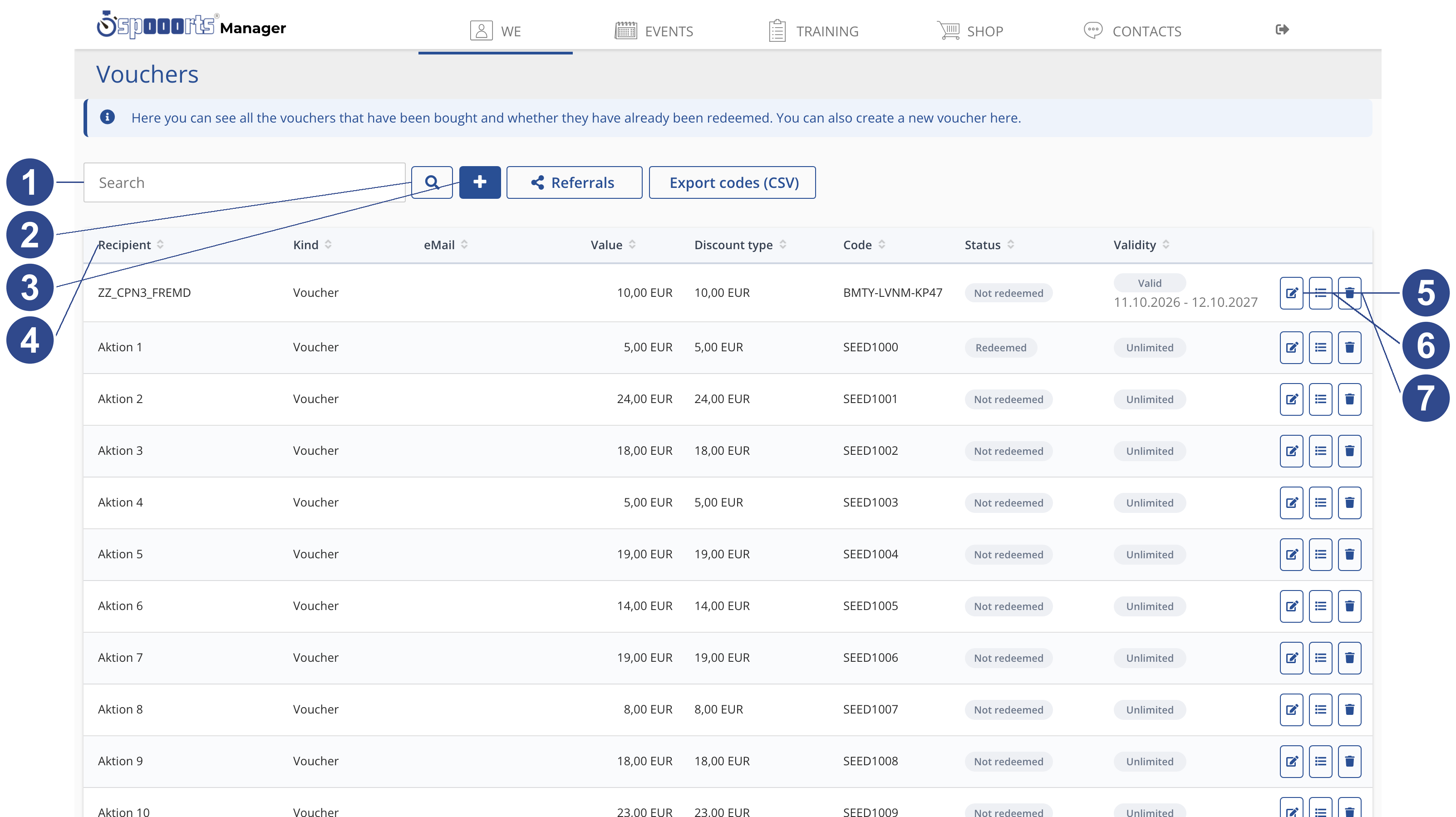
- ① Search
- Filters the voucher list by the text you type.
- ② Search
- Runs the search for the entered term.
- ③ Create new voucher
- Opens the form to create a new voucher.
- ④ Sort columns
- Sorts the list in ascending or descending order by this column.
- ⑤ Edit voucher
- Opens the voucher to change its value, code and validity.
- ⑥ View voucher
- Shows the voucher as a PDF to view or print.
- ⑦ Delete voucher
- Permanently removes the voucher after a confirmation prompt.
Creating a Voucher
Navigate to the Vouchers section and click + to create a new voucher:
- Name – Give the voucher a label (e.g. "Birthday Gift" or "Early Bird Reward").
- Value & Currency – Set the voucher value and currency.
- Email – Enter the recipient's email address to send the voucher to.
After saving, a unique voucher code is generated automatically and a printable PDF certificate is created.
Managing Vouchers
The voucher list shows all created vouchers with code, value and recipient email. Use the search function to filter by voucher code or email address to quickly check the status of individual vouchers.