P&L / Balance
P&L / Balance shows a general-ledger statement: profit-and-loss accounts form the P&L, balance accounts the balance-sheet movement.
What is P&L / Balance for?
You will find this page in the menu under We → Finance → Reports → P&L / Balance.
P&L / Balance is a read-only view: profit-and-loss accounts form the Profit and loss, balance accounts the balance-sheet movement. Optionally you restrict the statement to a period range (format YYYYMM). To open the page you need access to the finance or payment area; figures appear only when posted journal entries exist. This screen only displays; it has no create or save.
The screen at a glance
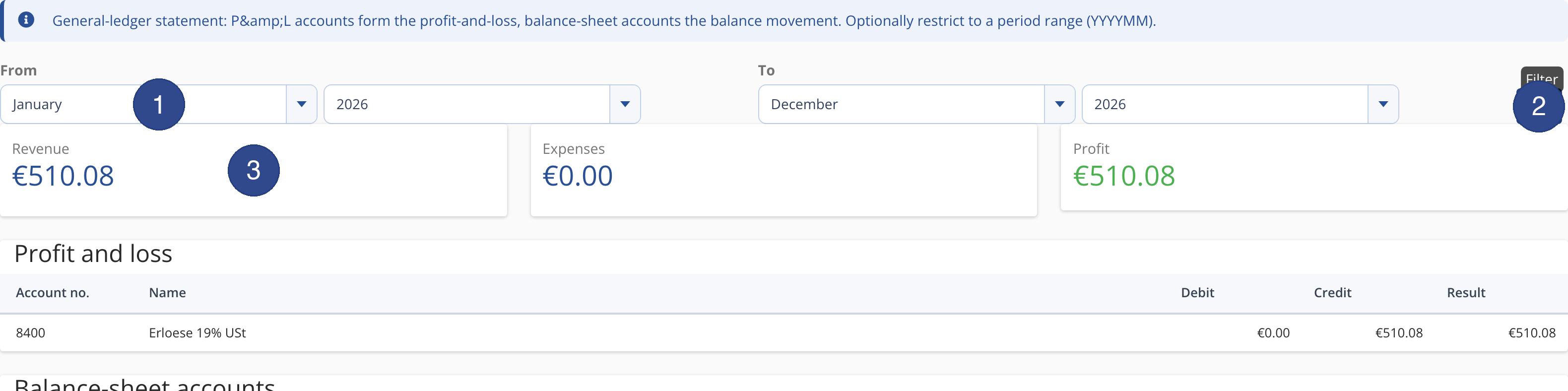
- ① Period
- Use the From selects (month and year) to set the start of the period; next to them, To sets the end.
- ② Filter
- The Filter button applies the chosen period.
- ③ Result cards
- The cards show the key figures: Revenue, Expenses and, depending on the balance, Profit or Loss.
Restrict the period
By default the current year is shown. In From and To choose a month and year each and click Filter to limit the period.
The Profit and loss table lists the accounts with Account no., Name, Debit, Credit and Result. The Balance-sheet accounts table shows the balance accounts.