System Emails
System emails are the automatic emails spooorts sends for you — such as registration confirmations, consent requests or receipts. Text, subject and design can be adjusted per mail.
Overview
You find this page in the menu under We → Settings → Templates.
System emails are sent automatically by spooorts for you — for example registration confirmations, consent requests or receipts. For each mail you can adjust the text, subject and design. Using the preview and the test mail you see the result with sample data before the mail goes to real recipients.
Viewing and adjusting system emails
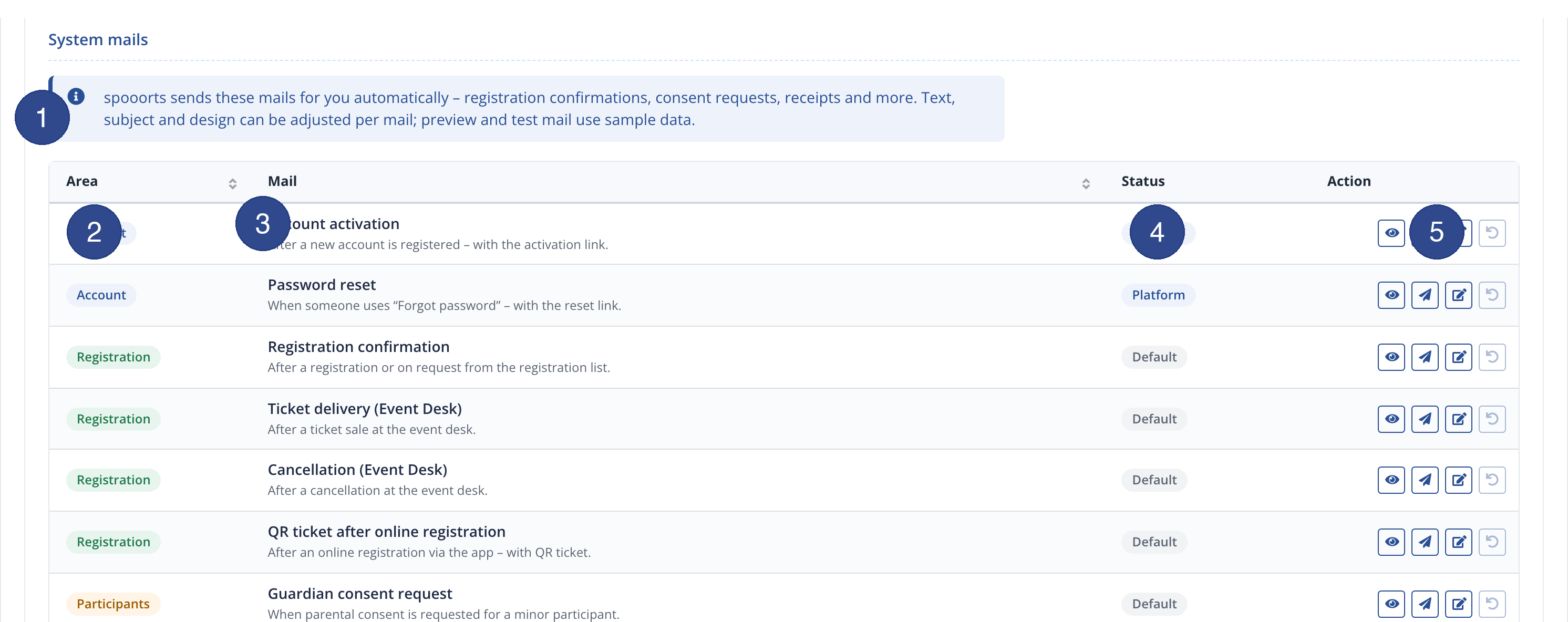
- ① Note
- The note explains that these mails are sent automatically and that text, subject and design can be adjusted per mail; preview and test mail use sample data.
- ② Area
- The coloured category assigns each mail to an area — e.g. Account, Registration or Participants.
- ③ Mail
- The name and short description explain when the mail is triggered (e.g. "After a registration" or "QR ticket after online registration").
- ④ Status
- The status shows whether the mail runs on the Default or is centrally managed as a Platform mail.
- ⑤ Action
- For each mail four actions are available: preview (eye), send test mail (paper plane), edit (pencil) and reset to the default template (arrow).
Tips
- At least adjust the tone and design to your organization — these mails are an important touchpoint with your members.
- Send yourself a test mail before activating, to check text and layout.
- With reset you can restore the default template at any time.
- Newsletters and email campaigns (marketing) are separate — system emails are purely transactional.