Documents
The document store is your central place for bylaws, minutes, contracts, legal texts and forms — with versioning, access tiers and an optional public link.
Overview
You find this page in the menu under We → Documents.
Documents is your organization's central store for bylaws, minutes, contracts, legal texts and forms. Each document has a version and an access tier (visibility) — from internal to public. Public documents can be embedded via a fixed link (e.g. /doc/terms), for example on your website.
Because every document carries a version and an access level, it is always clear which version currently applies and who may see it — from the internal draft to the publicly linked form.
Viewing and managing documents
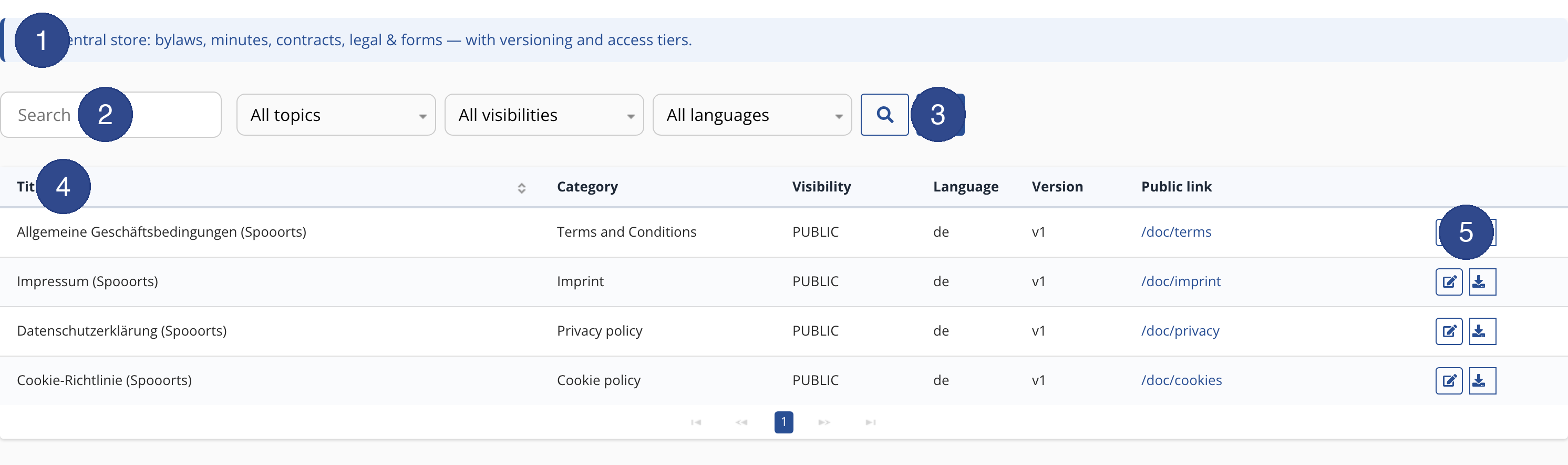
- ① Search
- Filters the document list by the text you type, e.g. by title. This helps you find the right one quickly even with many documents.
- ② Search
- Runs the search for the entered term.
- ③ New document
- Opens the form to upload or link a new document, e.g. bylaws, a form or house rules.
- ④ Title
- The document's name. Click the column to sort the list alphabetically by title.
- ⑤ Visibility
- Sets who may see the document, e.g. internal only or public on your website. This controls which files are visible to members or guests.
- ⑥ Edit
- Opens the document to change its title, category, visibility or the stored file.
Tips
- Choose the visibility deliberately — only truly public documents should get the "PUBLIC" tier.
- Use versioning: when editing, the history is preserved.
- Link public documents (e.g. terms, privacy) via the fixed link on your website.
- File documents in suitable categories so they are quickly findable via the filters.