Voting & Surveys
With the voting engine you create lightweight surveys, event live polls and legally-binding club votes — with configurable scope and anonymity.
Overview
You find this page in the menu under Contacts → Voting.
The voting engine covers three use cases: lightweight surveys (e.g. quick opinion polls), event live polls (voting during an event) and legally-binding club votes (e.g. resolutions of a general meeting). For each vote you define the scope and the anonymity.
After a vote ends, the results are immediately available as an evaluation and, for legally binding decisions, can be documented in an audit-proof way so they hold up, for example, in the minutes of a general meeting.
Viewing and managing votes
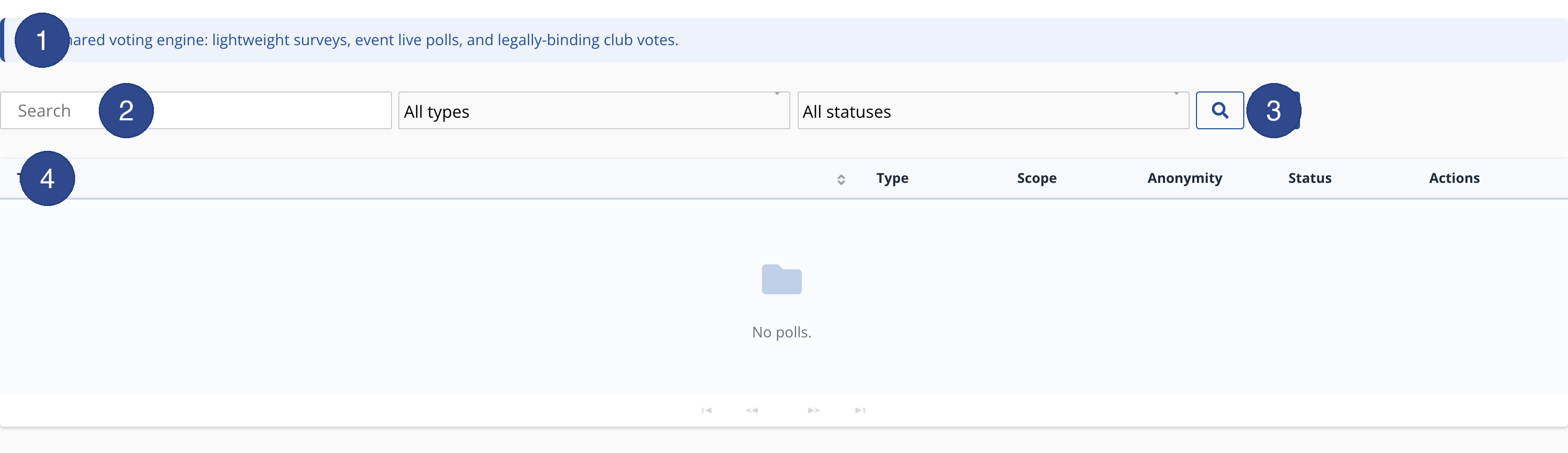
- ① Note
- The note describes the shared voting engine for surveys, event live polls and legally-binding club votes.
- ② Search & filter
- Use the search field and the All types and All statuses filters to quickly find a specific vote. The magnifier starts the search.
- ③ Create vote
- Use the plus button to create a new vote or survey, choosing type, scope and anonymity.
- ④ Sortable columns
- The table shows Title, Type, Scope, Anonymity, Status and Actions.
Tips
- For formal club resolutions, choose the "legally-binding vote" type and set the scope accordingly.
- Use anonymous votes when a secret ballot is required.
- Use event live polls to involve participants during an event.
- Bundle a meeting's resolutions via the general meeting.