SEPA Direct Debit
With SEPA you manage your members' direct-debit mandates and create SEPA runs to collect dues and receivables. The pain.008 files can be exported for your bank.
Overview
You find this page in the menu under We → Finance → Income & invoicing → SEPA.
With the SEPA direct-debit scheme you conveniently collect dues and open receivables from your members' accounts. For this you need a valid SEPA direct-debit mandate per member. Once the mandates are stored, you create a SEPA run at regular intervals that bundles all due collections and is exported as a pain.008 file for your bank.
Views
The page is divided into two tabs: under Mandates you manage the individual direct-debit mandates. Under Runs you create and track the SEPA collections.
Managing mandates
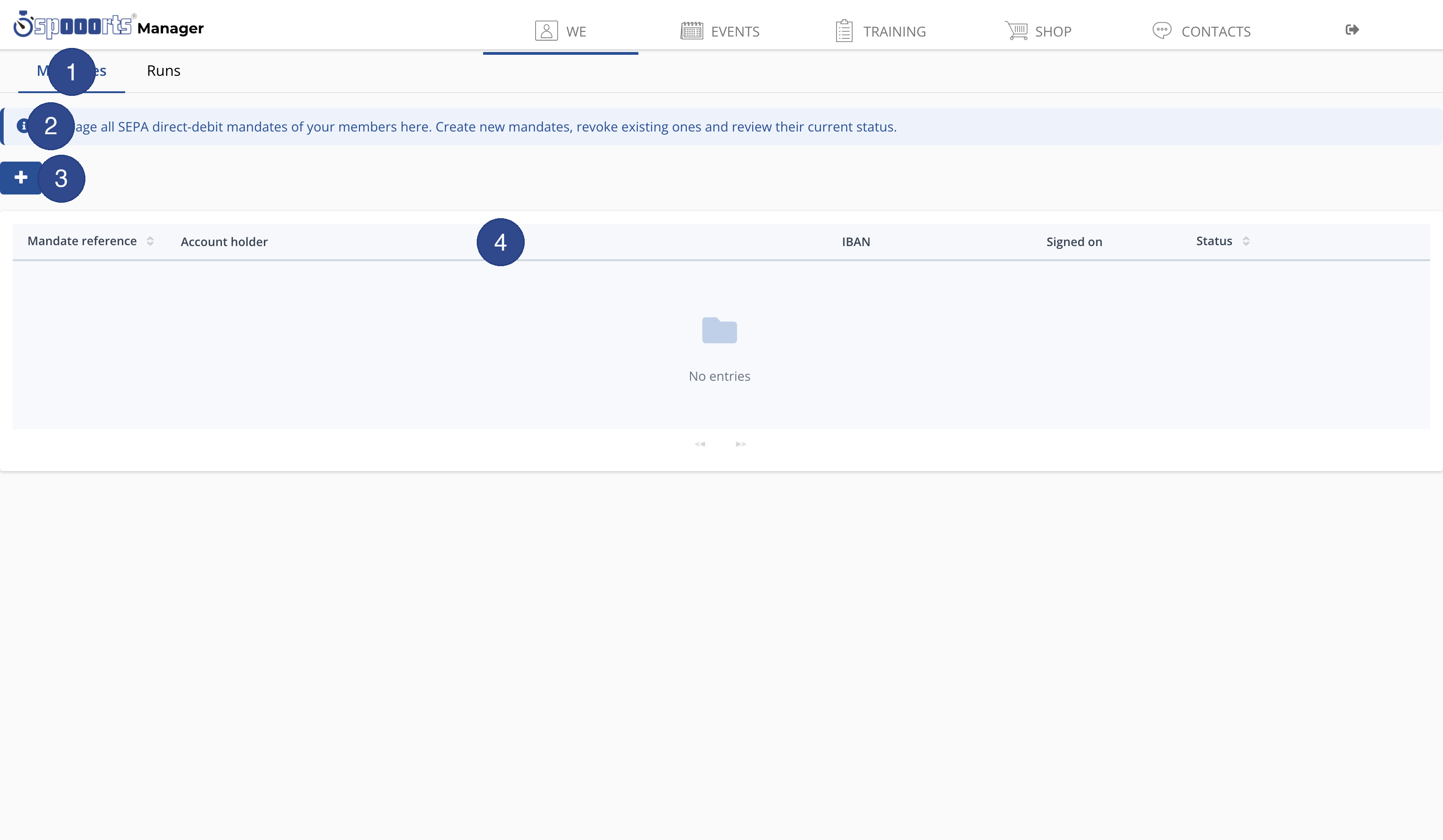
- ① Views
- Use the two tabs to switch between Mandates (your members' direct-debit mandates) and Runs (the SEPA collections).
- ② Note
- The note explains that here you manage all SEPA direct-debit mandates of your members — create new ones, revoke existing ones and review their current status.
- ③ New mandate
- Use the plus button to create a new mandate. Here you enter the account holder, IBAN and the signature date.
- ④ Sortable columns
- The table shows Mandate reference, Account holder, IBAN, Signed on and Status. Click a column header to sort the list.
For each mandate you will find buttons at the end of the row to edit and to revoke a mandate.
Creating SEPA runs
On the Runs tab you create a collection via Create new SEPA run. The table shows for each run the message ID, the execution date, the payment provider, the number of items, the total amount and the status. From the detail view you can download the corresponding pain.008 file and start the run with Run now.
Tips for direct debit
- Create a valid mandate for every member before the first collection — without a mandate no direct debit is possible.
- Revoke mandates as soon as a member cancels or changes their account.
- Download the pain.008 file and submit it to your bank, or use the connection to your payment provider.
- Track the status of the runs to detect return debits early.