Budget planning
In budget planning you set one planned amount per expense category for each fiscal year – the basis for the later plan-vs-actual comparison.
What is budget planning for?
You will find this page in the menu under We → Finance → Budget planning.
In budget planning you plan an amount per expense category – for each Fiscal year and for the chosen Section. This plan is the basis for the later plan-vs-actual comparison. To open the page you need access to the finance or payment area.
The screen at a glance
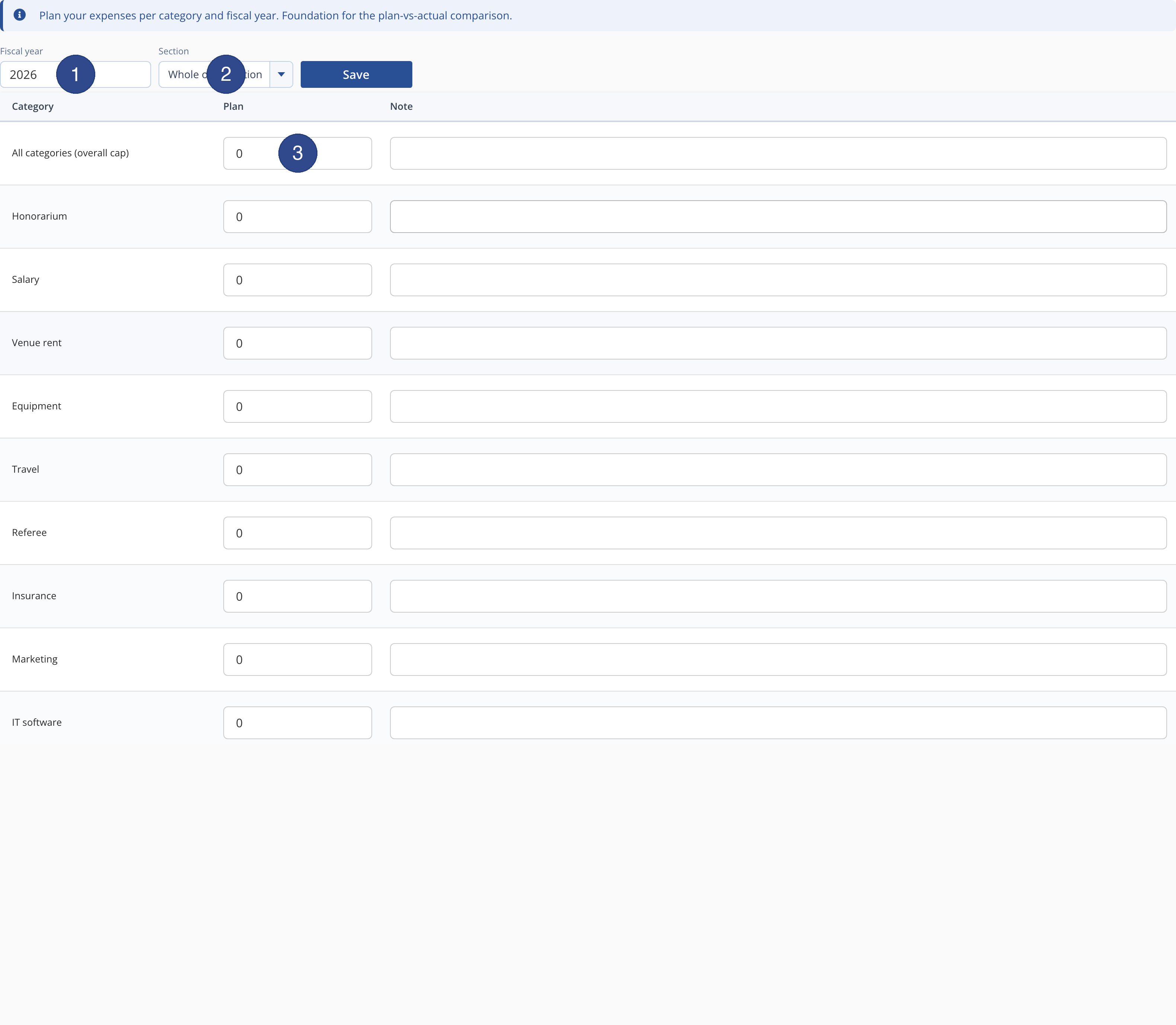
- ① Fiscal year
- Use the Fiscal year field to choose which year you are planning the budget for.
- ② Section
- The Section dropdown sets the scope. With the Whole organization option you plan for the entire organization instead of a single section.
- ③ Plan column
- In the Plan column you enter the planned amount per Category – one row per category.
Step by step: plan a budget
- Open We → Finance → Budget planning.
- Choose the Fiscal year.
- Choose the Section; for the entire organization pick Whole organization.
- In the Plan column, enter the planned amount per Category, and a Note if needed.
- Click Save.
Good to know
Besides the individual categories, you can set an overall planned value via All categories (overall cap).
Tipp Use the Note column to record how a planned amount was derived – this helps with the later plan-vs-actual comparison.