Scheduled tasks & jobs
Schedule time-controlled batch tasks via a cron expression, run them manually, edit and delete.
Overview
Under ADMIN → Jobs you plan time-controlled batch tasks. Scheduled batch tasks of the backoffice and spooortsbatch modules: importers, robots, syncs and the dispatch jobs of the mail campaigns all run through the same scheduler – automatically by cron expression or on demand. The schedule lives in the boschedjob table; the triggers are rebuilt from it when the server starts.
The task list
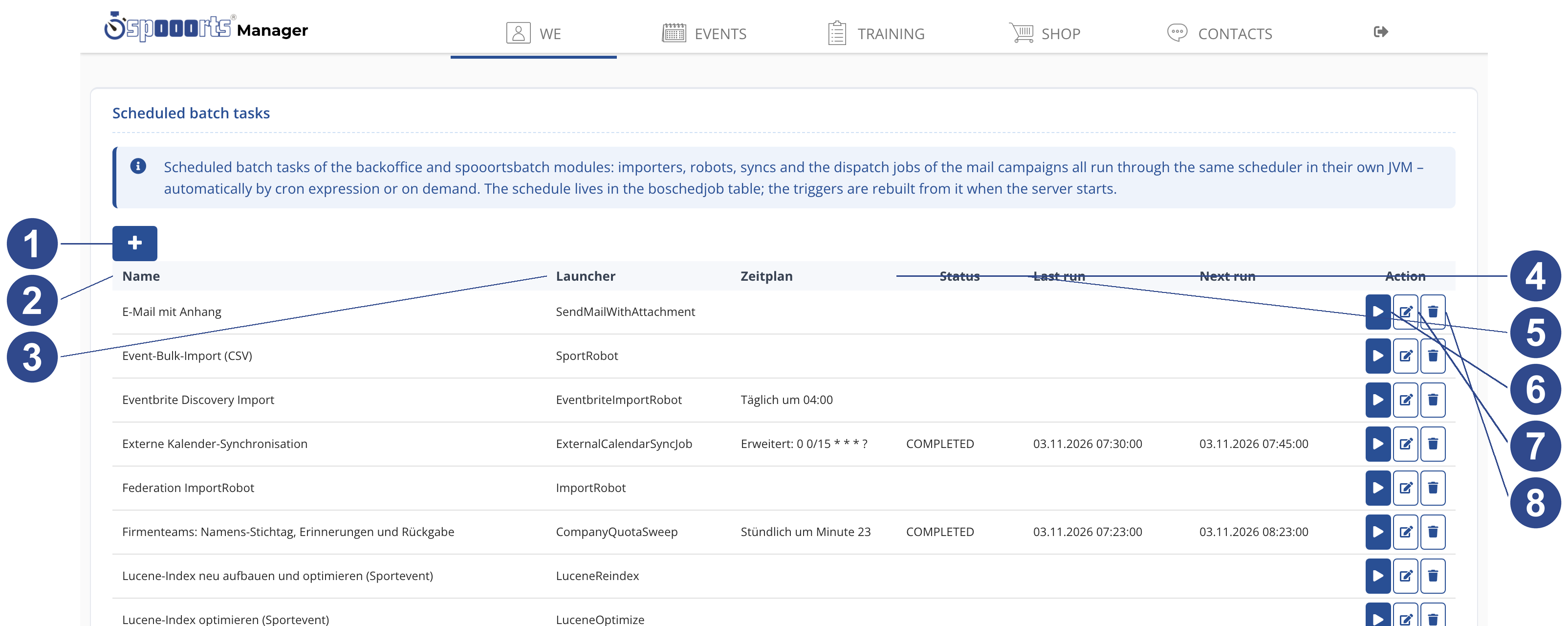
- ① New task
- Creates a new scheduled task – with launcher and schedule. Useful e.g. for recurring imports or reminders.
- ② Name
- The task's name, so you can tell at a glance what it does.
- ③ Launcher
- The executing component (robot/class) that does the actual work when the task runs.
- ④ Schedule
- The schedule as a cron expression. If empty, the task runs only when you start it manually.
- ⑤ Status
- The current state of the task, e.g. completed or currently running.
- ⑥ Run now
- Runs the task immediately by hand, regardless of the schedule, e.g. for testing.
- ⑦ Edit
- Opens the task to change its launcher, schedule and parameters.
- ⑧ Delete
- Permanently removes the scheduled task after a confirmation prompt.
Create, edit, run
With + you create a new task (General and Schedule sections). The schedule is a cron expression – format sec min hour day-of-month month day-of-week, e.g. 0 0 3 * * ? daily at 03:00. Per row: Run now (play), Edit, Delete; a task log shows the runs.
Limits
Note Importers and robots (e.g. ImportRobot) are internal system tasks. The sending jobs of mail campaigns are managed in the campaigns themselves.