Trainer Management
In trainer management you maintain your roster of trainers and coaches with employment type, status and license link. The roster can be derived from existing sources.
Overview
You find this page in the menu under Training → Trainers.
In trainer management you keep all trainers and coaches of your organization. For each person you store the employment type, the status and the license link. You can derive the roster automatically from existing sources — such as section coaches or event instructors. On this basis you plan availability, compensation and substitutions.
Viewing and managing trainers
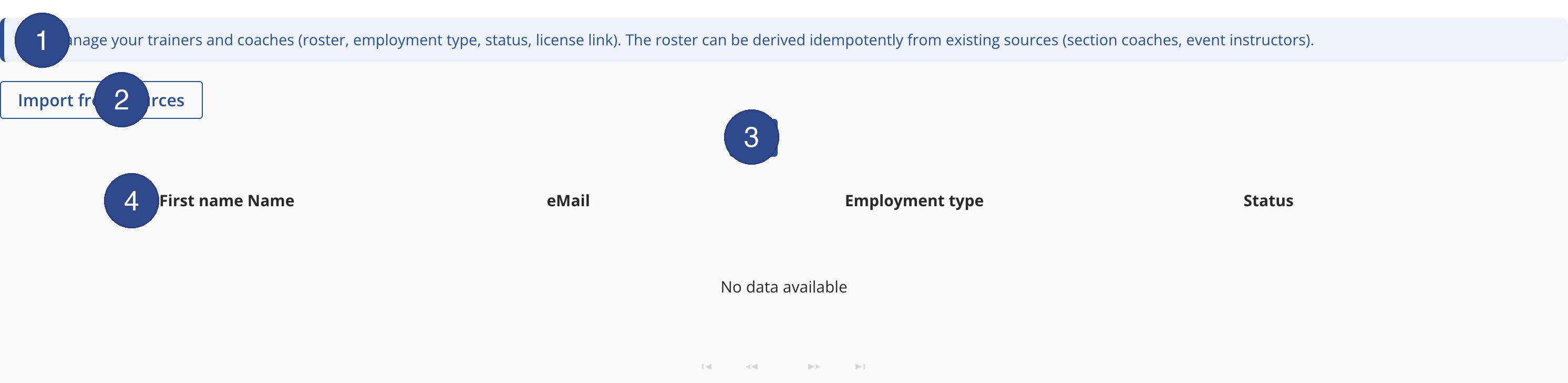
- ① Note
- The note explains that here you manage trainers and coaches (roster, employment type, status, license link) and can derive the roster from existing sources.
- ② Import from sources
- Use this button to import trainers automatically from existing sources (section coaches, event instructors). The operation is idempotent — running it multiple times creates no duplicates.
- ③ Add trainer
- Use the plus button to create a new trainer manually.
- ④ Sortable columns
- The table shows First name Last name, eMail, Employment type and Status.
More trainer functions
Around trainer management, further areas are available:
- Availability — record when a trainer is available for events.
- Qualifications — document training and further education.
- Licenses — manage trainer licenses and their validity.
- Compensation and trainer rates — define honoraria and hourly rates (see also Expenses & Compensation).
- Substitutions — plan cover when a trainer is unavailable.
Connecting external calendars
Availability knows weekly times, absences, preferences and external busy times. You link external calendars (iCal, Apple, Google, Outlook) via the calendar settings: spooorts subscribes to the public calendars (.ics) read-only and enters them as busy times, so the trainer schedule produces no double bookings. You switch each feed on or off individually.
Tips
- Use "Import from sources" to keep the roster up to date without duplicate maintenance.
- Link licenses so you detect expired qualifications in time.
- Maintain availability so that scheduling and substitution planning run smoothly.