Courses
In the course catalog you create the courses of your organization — with name, description, capacity, duration, level and price. Room, trainer and group are assigned only when you create a calendar event.
Overview
You find this page in the menu under Training → Courses.
The course catalog describes the "what" of your offering: a course defines name, description, capacity, duration, level and price. The "when" and "who" — that is room, trainer and group — is assigned only when you create a specific event in the calendar. This way you describe a course once and schedule it as often as you like.
Viewing and managing courses
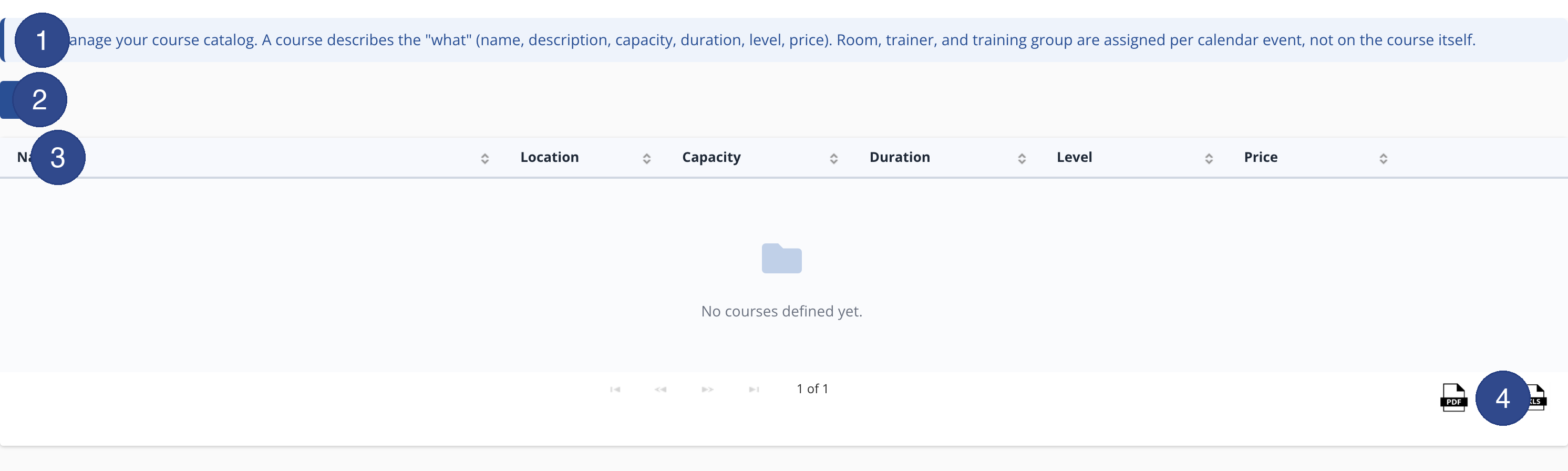
- ① New course
- Opens the form to create a new course. A course describes the "what" – name, capacity, duration, level and price; room, trainer and group are set later when scheduling in the calendar.
- ② Name
- The course name. Click the column to sort the catalog alphabetically.
- ③ Level
- The level of the course, e.g. beginner or advanced. This helps participants find the right course.
- ④ Price
- The price to take part in the course; if empty, the course is free or covered by a pass.
- ⑤ Edit
- Opens the course to change its name, description, capacity, duration, level and price.
- ⑥ Delete
- Permanently removes the course from the catalog after a confirmation prompt. Remove any scheduled dates from the calendar first.
Courses and the calendar
A course in the catalog is initially a template. To actually run it, you create an event for the course in the calendar and assign room, trainer and group. This lets you offer the same course on different days, in different rooms and with different trainers.
Tips
- Describe each course the way your members should see it — name and description also appear during booking.
- Set the capacity to match the room so that booking is limited automatically.
- Use the level (e.g. beginner, advanced) so members can find the right course.
- Create a course only once and schedule it as often as you like via the calendar.