Account and balance
In Account and balance you pick a team, training group or relay and manage its money across seven tabs.
What is Account and balance for?
You will find this page in the menu under We → Finance → Income & invoicing → Account and balance.
Account and balance is the team or member account. At the top you pick a Team, training group or relay and then manage its money across seven tabs. To open the page you need finance or cashier access; in addition, at least one team must exist, otherwise you create one first.
The screen at a glance
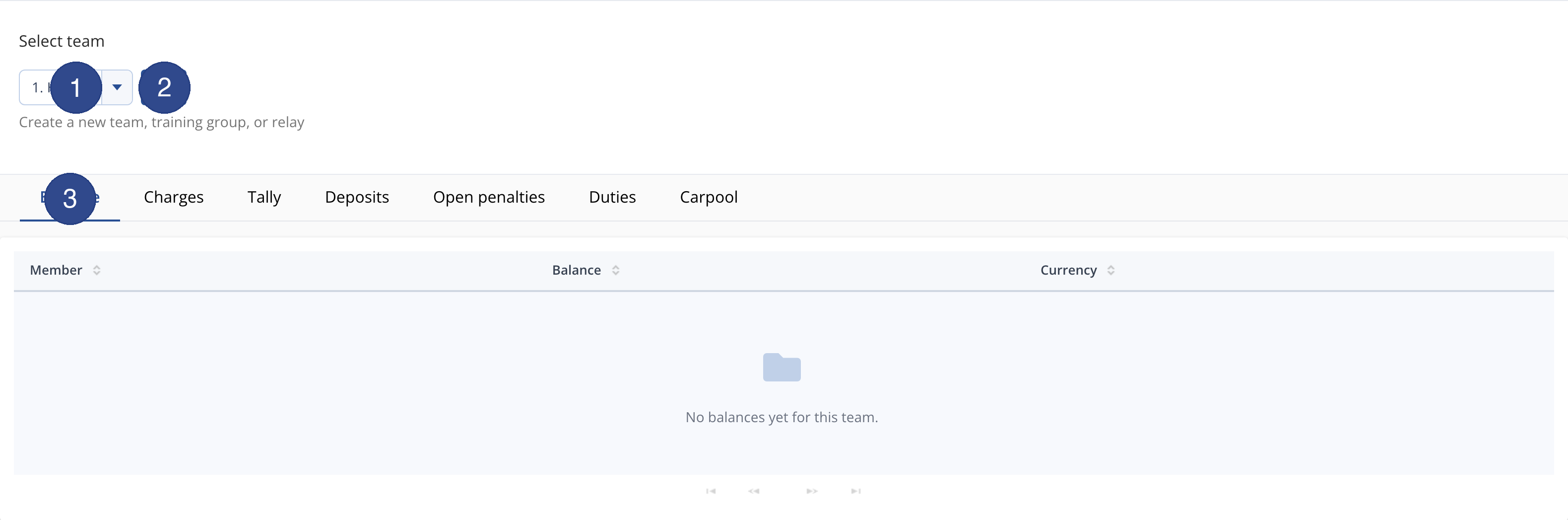
- ① Select team
- The Select team dropdown at the top determines which team, training group or relay the account shows.
- ② New team
- The New team button opens a dialog for creating one (Create a new team, training group, or relay).
- ③ Page tabs
- The tab row leads through the topics: Balance, Charges, Tally, Deposits, Open penalties, Duties and Carpool.
Step by step: run the account
- Open We → Finance → Income & invoicing → Account and balance.
- Pick a team at the top via Select team. If there is none yet, click New team, fill in Name, Short code and Kind (Team, Training group or Relay) and click Save.
- Then work through the seven tabs.
- Balance
- The tab with the current balance of the selected team.
- Charges
- The tab for the charges split across the members.
- Tally
- The tab with a tally list for counting.
- Deposits
- The tab for the deposits received.
- Open penalties
- The tab with the penalties still open.
- Duties
- The tab for the team's duties.
- Carpool
- The tab for the team's carpools.
Good to know
Tip The Balance tab stays empty until there are ledger entries.