Cancellation policies
Reusable rules for cancellation, transfer, distance switch and deferral – with deadlines, fees and staggered refunds. They apply to events, trainings, shop products and memberships.
What are cancellation policies?
You find this page in the menu under We → Settings → Cancellation Policies.
A cancellation policy bundles the rules for what participants may change about their booking and what it costs – cancel, transfer the place, switch distance or move the date.
You create the policy once and assign it to many offers: events, trainings (courses, slots, rentals), shop products and memberships. Two tabs separate the Rules (cancellation) and the Memberships (termination).
Creating a policy
Open the cancellation policies in the spooorts Manager, stay on the Rules tab and click + (new policy). The policy editor opens.
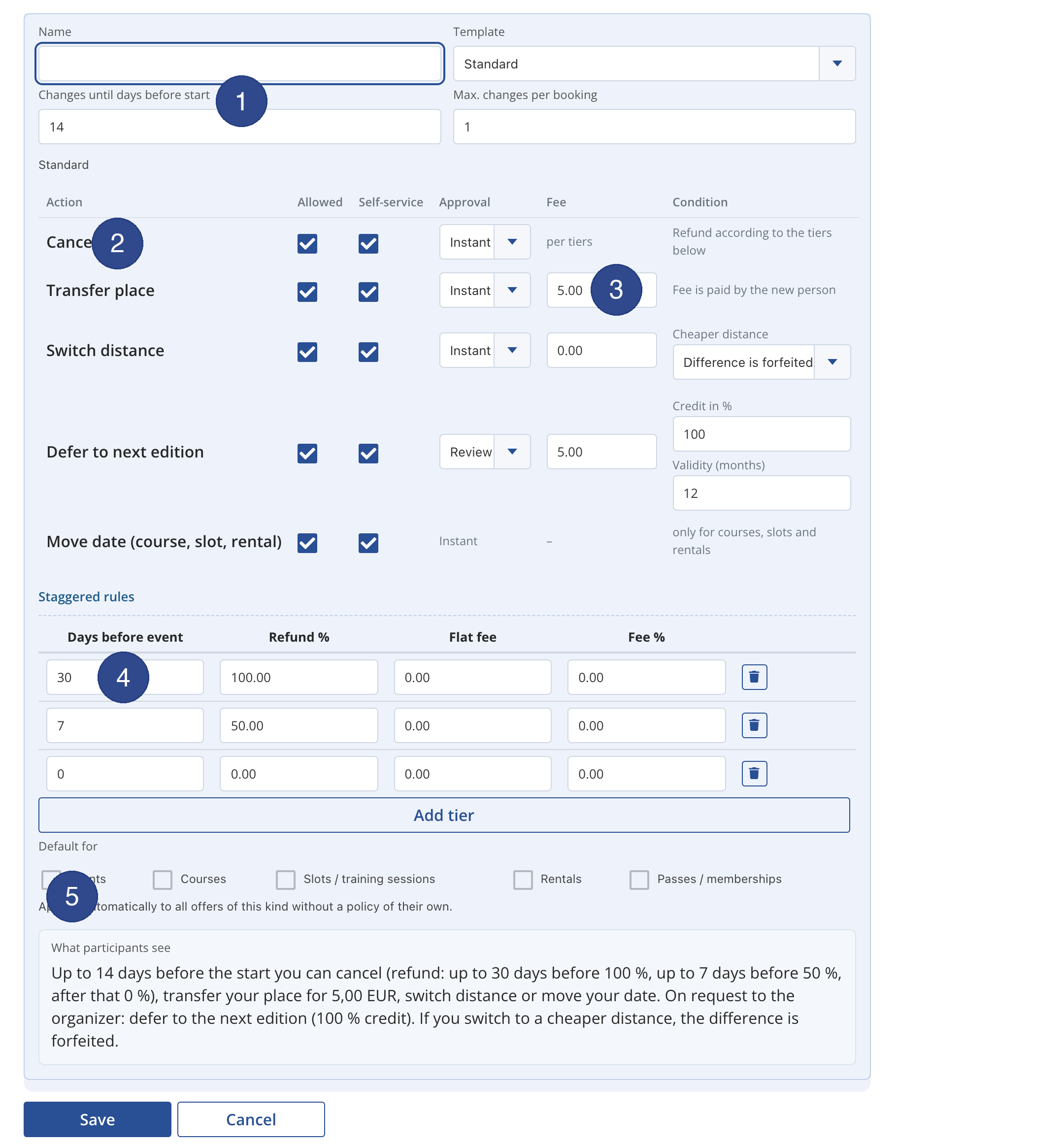
- ① – Name, template and deadlines
- Give the policy a Name and choose a Template (e.g. Standard) as a starting point. Changes until days before start is the overall deadline, Max. changes per booking limits how many changes are allowed.
- ② – Action matrix
- For each action (Cancel, Transfer place, Switch distance, Defer to next edition, Move date) you decide whether it is Allowed and whether participants may trigger it themselves (self-service).
- ③ – Approval, fee and condition
- For each action you choose the Approval (Instant or Review) and the Fee. The Condition column on the right handles special cases (per tiers, fee paid by the new person, cheaper distance, credit and validity).
- ④ – Staggered rules
- The refund by days before event: Refund % plus Flat fee and Fee % per tier. Add tier adds another (e.g. 30 days 100 %, 7 days 50 %, 0 days 0 %).
- ⑤ – Default for
- Mark which offer kinds (Events, Courses, Slots/training sessions, Rentals, Passes/memberships) the policy applies to automatically. Below, What participants see shows the text from the participant's view.
The actions
Each row of the matrix stands for a change participants can make:
- Cancel
- Participants cancel; the refund amount follows the staggered rules below.
- Transfer place
- The place passes to another person. The transfer fee is paid by the new person.
- Switch distance
- Switch to another rating or distance. With a cheaper distance the difference is forfeited (or credited, depending on the setting).
- Defer to next edition
- The booking moves to the next edition – with a credit in % and a validity in months. Usually set to Review.
- Move date (course, slot, rental)
- Only for courses, slots and rentals: the booked date is moved.
Allowed enables the action at all, Self-service lets participants do it themselves, and Approval decides whether it takes effect instantly or you review it first.
Staggered refund
The staggered rules decide how much comes back on a cancellation – the closer to the event, the less:
- Days before event
- From how many days before the event the tier applies.
- Refund %
- How much of the price is refunded.
- Flat fee / Fee %
- A fixed or percentage cancellation fee that is kept.
Add tier adds more tiers, the trash icon removes one. Example: 30 days 100 %, 7 days 50 %, after that 0 %.
Defaults and memberships
Via Default for the policy applies automatically to all offers of the marked kind that have no policy of their own. What participants see sums up the rules automatically from the participant's view, and Used in counts the offers that use it.
The second tab Memberships manages separate termination policies for memberships (notice period, minimum term, automatic renewal and more).