Italy — providers & configuration (FatturaPA)
This page gathers the configuration for electronic invoicing through the Italian Sistema di Interscambio (SdI): seller identity, transmission channel and retention.
What is the Italy configuration for?
You find this page in the menu under We → Finance → Income & invoicing → Italy configuration. The page appears under Finance only once an operating location in Italy has been set up (the menu entry is country-gated).
Here you configure FatturaPA invoicing through the SdI (Sistema di Interscambio): seller identity, SdI transmission channel, Conservazione (substitute retention) and an RFC-3161 time-stamp authority. It requires an operating location in Italy.
The screen at a glance
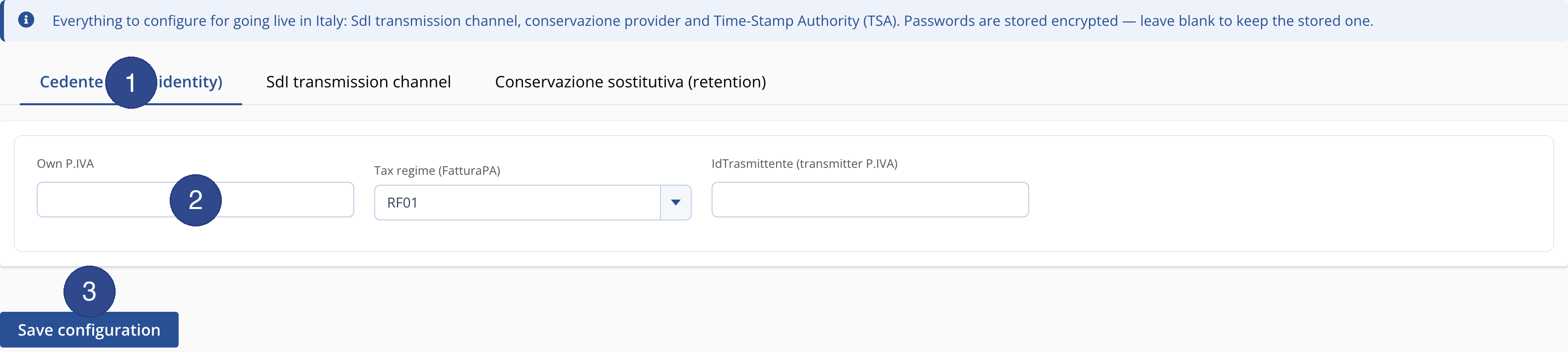
- ① Cedente (seller identity)
- The first tab Cedente (seller identity) is active when the screen opens.
- ② Own P.IVA
- Own P.IVA is the field for the business’s own tax identifier.
- ③ Save configuration
- The Save configuration button (label below) saves the configuration.
The tabs and fields
The configuration is organised in three tabs.
The Cedente (seller identity) tab holds the seller identity. Own P.IVA is the business’s own Italian VAT identifier (Partita IVA). Tax regime (FatturaPA) holds the FatturaPA regime code chosen from a drop-down; the list shows the official code, for example RF01.
The SdI transmission channel tab defines how invoices reach the Sistema di Interscambio (SdI): IdTrasmittente (transmitter P.IVA) names the transmitter, Channel selects the transmission mode, Endpoint / server URL is the server address and PEC mailbox (sender) is the PEC sender address.
The Conservazione sostitutiva (retention) tab covers substitute retention: Mode selects the retention mode and TSA URL (timestamp, RFC-3161) is the address of the RFC-3161 time-stamp authority.
Password and secret fields show (stored) when a value is already saved; leaving them blank keeps the stored value.