Equipment
In the equipment area you manage club-owned gear, jerseys and material as fixed assets — including check-out, return, location, section, vendor and condition.
Overview
You find this page in the menu under We → Equipment.
In the equipment area you keep your organization's inventory — gear, jerseys and material as fixed assets. For each item you store location, section, vendor, condition and current value. Using check-out and return you keep track of who is currently using which material.
Via the lending and return function you see at any time which equipment is currently in use and who is using it; due returns and the condition of the equipment can thus be tracked seamlessly.
Viewing and managing inventory
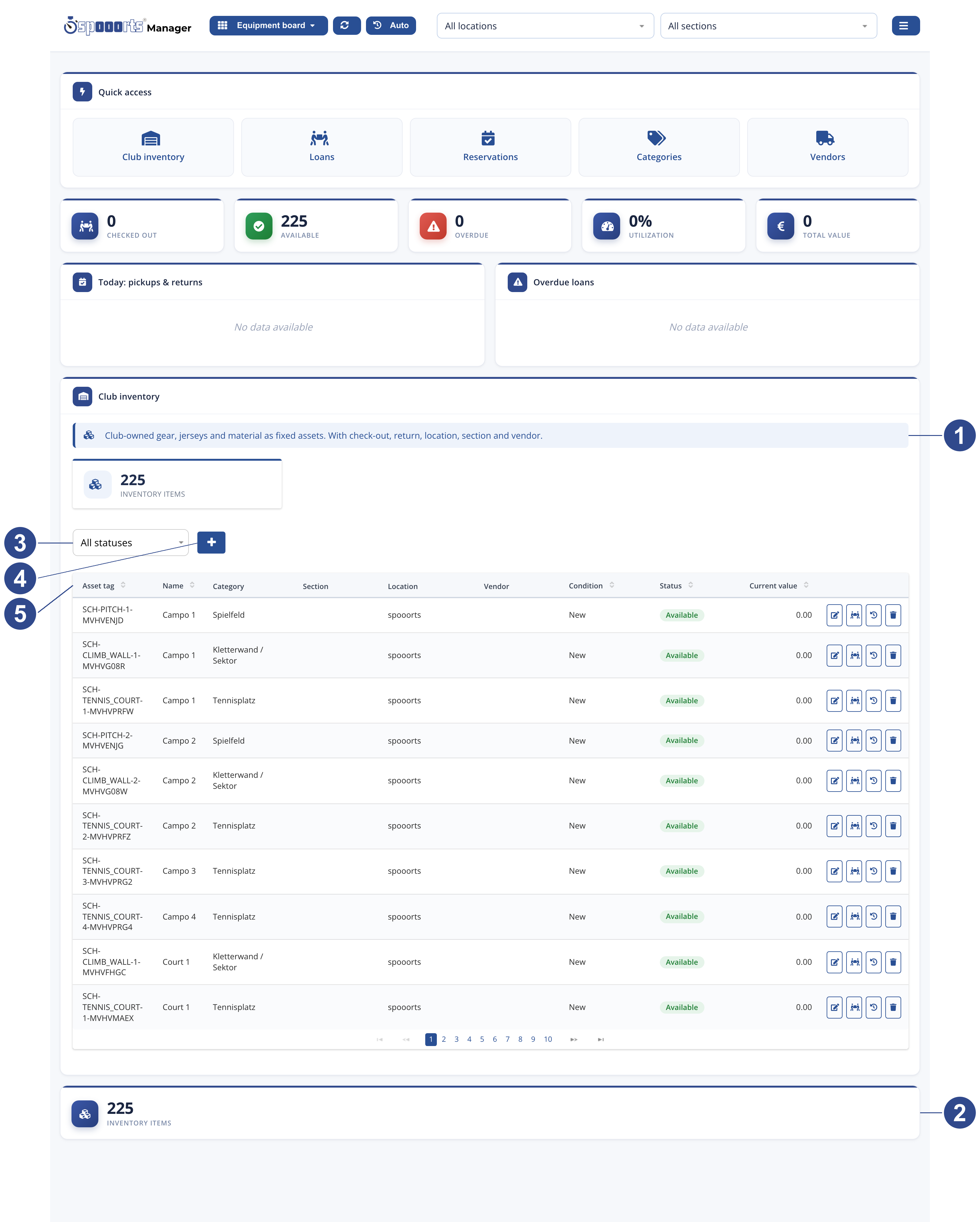
- ① Note
- The note explains that here you manage club-owned gear, jerseys and material as fixed assets — with check-out, return, location, section and vendor.
- ② Metric
- The tile shows the total number of inventory items at a glance.
- ③ Status filter
- Use the All statuses selector to narrow the list, for example to checked-out or available items.
- ④ Add item
- Use the plus button to create a new inventory item with all details.
- ⑤ Sortable columns
- The table shows Asset no., Name, Category, Section, Location, Vendor, Condition, Status and Current value.
Tips
- Record valuable purchases with vendor and current value — this documents your fixed assets.
- Use check-out and return so it stays traceable who has borrowed material.
- Assign items to a section and a location to find them quickly.