Passes & Punch Cards
Via Passes you define the different pass types — drop-in, visit pack, unlimited, trial and family. These are sold in the shop as a product of type "Pass".
Overview
You find this page in the menu under We → Settings → Passes.
With passes you offer flexible access models to your courses and training. A pass defines how many visits (credits) are included, how long it is valid and whether it is a subscription. Typical pass types are drop-in, visit pack (e.g. a 10-visit pack), unlimited, trial and family. Passes are sold in the shop as a product of type "Pass".
Viewing and managing passes
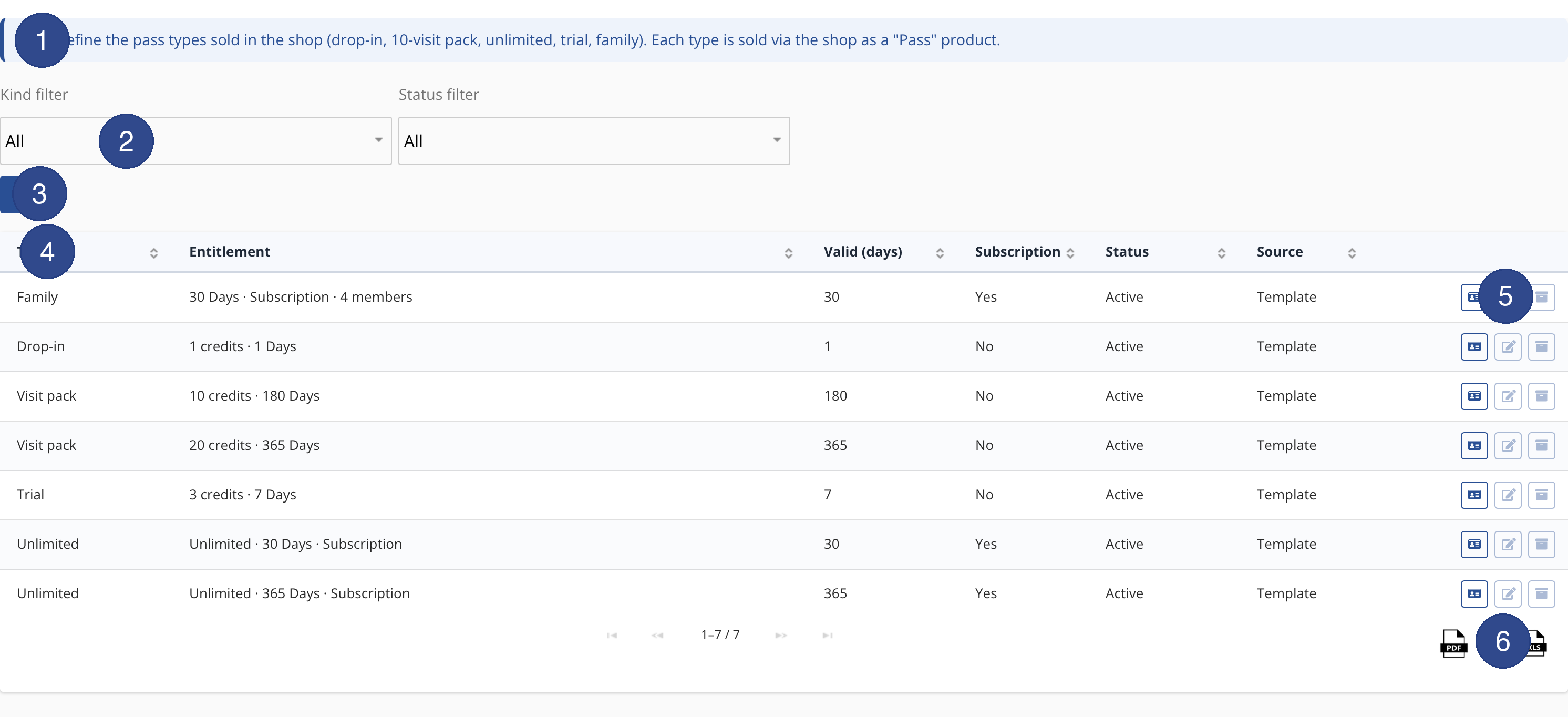
- ① Pass type filter
- Shows only passes of a certain type, e.g. only subscriptions or multi-cards. A second field next to it filters by status (active or archived).
- ② Add new pass type
- Opens the form for a new pass type, e.g. drop-in, 10-visit card, unlimited, trial or family. It is then sold in the shop as a product.
- ③ Origin
- Shows whether the pass type comes from a template or was created by you. Templates cannot be edited or archived, your own types can.
- ④ Issue pass
- Issues a pass of this type directly to a member, without going through the shop.
- ⑤ Edit
- Opens the pass type to change its benefit, validity, price and subscription setting.
- ⑥ Archive
- Archives the pass type so it is no longer sold, while already issued passes stay valid.
Pass types
- Drop-in — a single visit (1 credit).
- Visit pack — a balance of several visits (e.g. 10 or 20 credits) with a validity period.
- Unlimited — unlimited visits within a period, usually as a subscription.
- Trial — a discounted taster offer with a few visits.
- Family — a pass for several members of a household.
Tips
- Offer a mix of drop-in, visit pack and subscription to cover different usage habits.
- Use a trial pass to encourage new participants to make their first visit.
- Set up subscription passes (unlimited) if you want to generate recurring revenue.
- Since passes are sold in the shop, also check the product and price settings in the shop.