France — Chorus Pro / PPF
On this page you enter the credentials for Factur-X transmission through the French Chorus Pro / PPF portal.
What is the FR configuration for?
You find this page in the menu under We → Finance → Income & invoicing → FR configuration (Chorus). It appears under Finance only once an operating location (Standort) in France has been set up.
Here you configure the transmission of Factur-X e-invoices through the French Chorus Pro / PPF portal (PISTE OAuth2). The setup is identified by a SIREN. A French operating location is required; without it the menu entry does not appear.
The screen at a glance
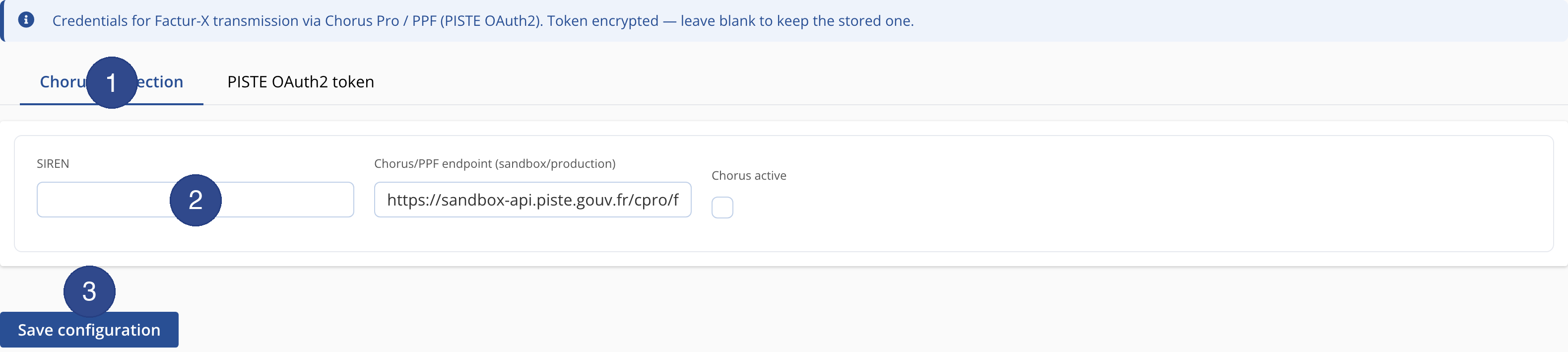
- ① Chorus connection tab
- The first tab Chorus connection groups the connection data for the portal.
- ② SIREN field
- The SIREN field holds the French company identifier by which the setup is identified.
- ③ Save configuration button
- The Save configuration button stores your entries.
The configuration fields
The Chorus connection tab contains the connection fields: SIREN (French company identifier), Chorus/PPF endpoint (sandbox/production) (address of the target portal) and the Chorus active checkbox, which switches the connection on or off.
The PISTE OAuth2 token tab contains the PISTE OAuth2 token field for the encrypted access token; per the hint shown in the mask it can be left blank to keep the token already stored.