Lifecycle
The lifecycle is a cockpit for rules around memberships: automatic age transitions plus due renewals and expiries.
What is the lifecycle for?
You will find this page in the menu under Contacts → Memberships → Lifecycle.
The lifecycle is a cockpit for rules around the member lifecycle, for example automatic age transitions between fee groups or sections, plus due membership renewals and expiries. With Refresh you see a preview of what is due (without any change); with Apply now you carry the changes out. To open the page you need access to the finance or payment area (contacts/memberships).
The screen at a glance
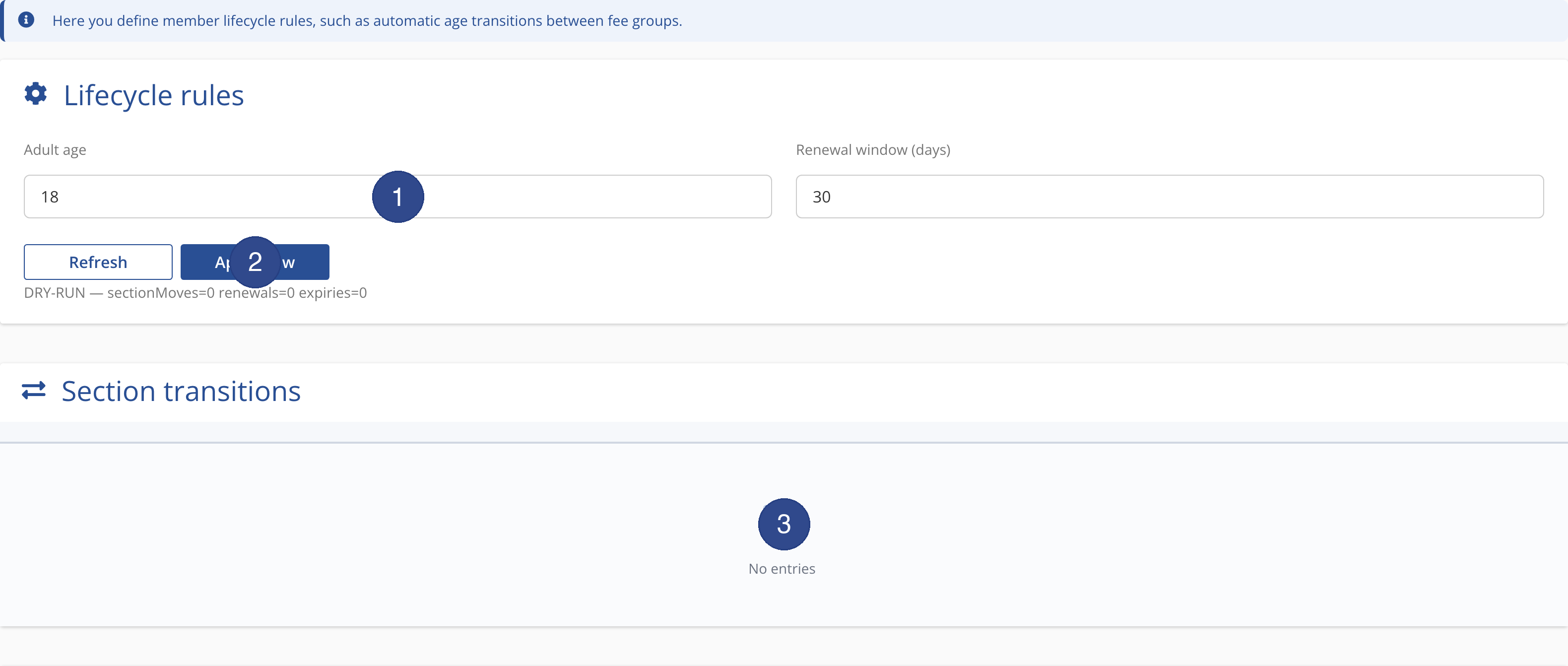
- ① Adult age
- In the Lifecycle rules card you set in the Adult age field the age from which a member counts as an adult.
- ② Apply now
- Use the Apply now button to actually carry out the changes shown earlier in the preview.
- ③ Section transitions table
- The Section transitions table is where due section transitions would be listed. In the example shown it is empty, because nothing is currently due.
Step by step
- Open Contacts → Memberships → Lifecycle.
- In the Lifecycle rules card set the Adult age and the Renewal window (days).
- Click Refresh to preview what is due; the three tables then fill.
- Check the Section transitions, Renewals and Expiries tables.
- Click Apply now to carry the changes out.
Good to know
Tip Refresh is only a preview and changes nothing. Only Apply now carries the changes out.