Expenses & Compensation
Under Expenses you record all club expenses such as fees, rent, material and charges with category, amount and status. Via Compensation you settle freelancer honoraria and volunteer stipends.
Overview
You find this page in the menu under We → Finance → Expenses & payouts → Expenses.
In the Expenses area you record all expenses of your club or studio — such as fees, rent, material or charges. Each expense receives a category, an amount and a status. You can approve expenses and mark them as paid. In addition, via Compensation you handle payouts to coaches, volunteers and freelancers.
Viewing and recording expenses
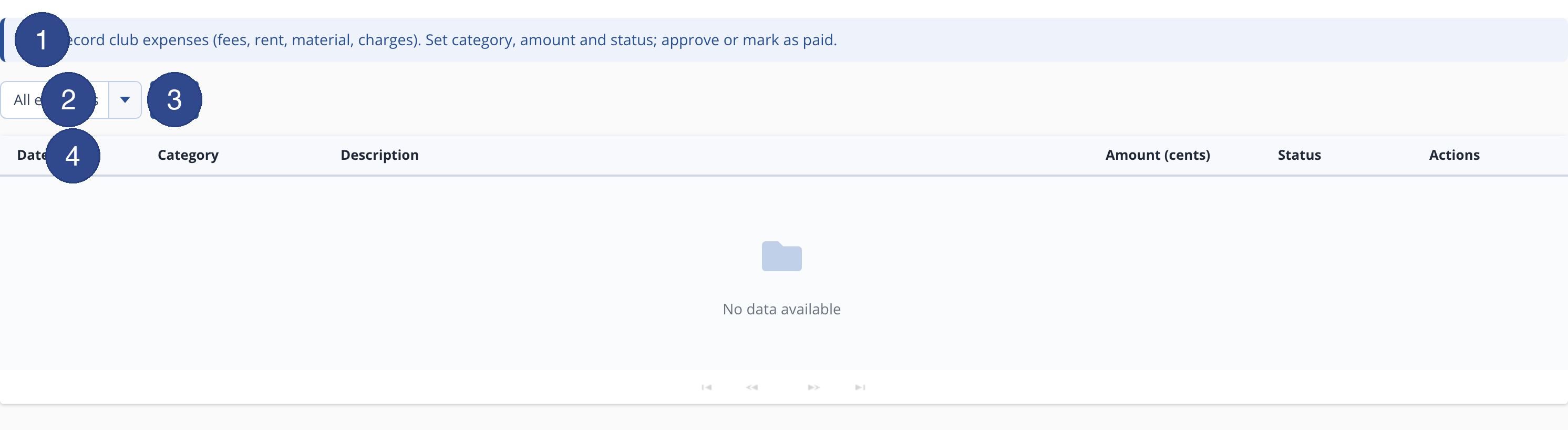
- ① Note
- The note explains that here you record club expenses (fees, rent, material, charges), set category, amount and status, and approve expenses or mark them as paid.
- ② Filter
- Use the All expenses selector to filter the list by status, for example by expenses not yet approved or already paid.
- ③ New expense
- Use the plus button to record a new expense with date, category, description and amount.
- ④ Sortable columns
- The table shows Date, Category, Description, Amount (cents), Status and Actions. In the Actions column you approve an expense or mark it as paid.
Compensation (honoraria and volunteer stipends)
Via Compensation you handle freelancer honoraria (studios) and volunteer stipends (clubs). Each person receives a contract with a type — freelancer, coach, volunteer, mini-job or permanent employee. The type controls the tax treatment and the receipt layout. You record a payout with gross amount, quantity (hours), period and notes; you can then approve or cancel it.
Tips
- Set up meaningful categories so that expenses can be analysed easily later.
- Use the approval status to implement a four-eyes principle for expenses.
- For compensation, choose the appropriate contract type — it determines the tax treatment.
- Mark expenses as paid promptly so that your reports stay accurate.